> For the complete documentation index, see [llms.txt](https://docs.maplestoryn.io/llms.txt). Markdown versions of documentation pages are available by appending `.md` to page URLs; this page is available as [Markdown](https://docs.maplestoryn.io/archives/learn-more/msu-explorer.md).

# MSU Explorer

## **Table of Content**

1. **What is MSU Explorer?**
2. **MSU Explorer Main Dashboard**
3. **MSU Explorer Navigation Tabs**

## **1. What is MSU Explorer?**

![](https://812147040-files.gitbook.io/~/files/v0/b/gitbook-x-prod.appspot.com/o/spaces%2FLn0ozm6YMyUQeaVEuGOu%2Fuploads%2F959PhzQ4MeYBV1xVzlk0%2F0.png?alt=media)

MSU Explorer is a platform where Maplers can view all on-chain data related to Henesys L1, the mainnet of MapleStory Universe.&#x20;

MSU Explorer is officially supported by CrossAngle that provides various crypto asset-related services through Xangle. MSU Explorer therefore operates under CrossAngle Terms of Service, separate from those of MapleStory Universe.&#x20;

For more details, please refer to the bottom-left section of MSU Explorer website.&#x20;

&#x20;\[[Go to Terms of Service](https://msu-testnet-explorer.xangle.io/term-of-service)]&#x20;

Additionally, important usage notices that Maplers must follow while using MSU Explorer are provided in the form of a Disclaimer, located to the right of the Terms of Service link.&#x20;

## **2. MSU Explorer Main Dashboard**

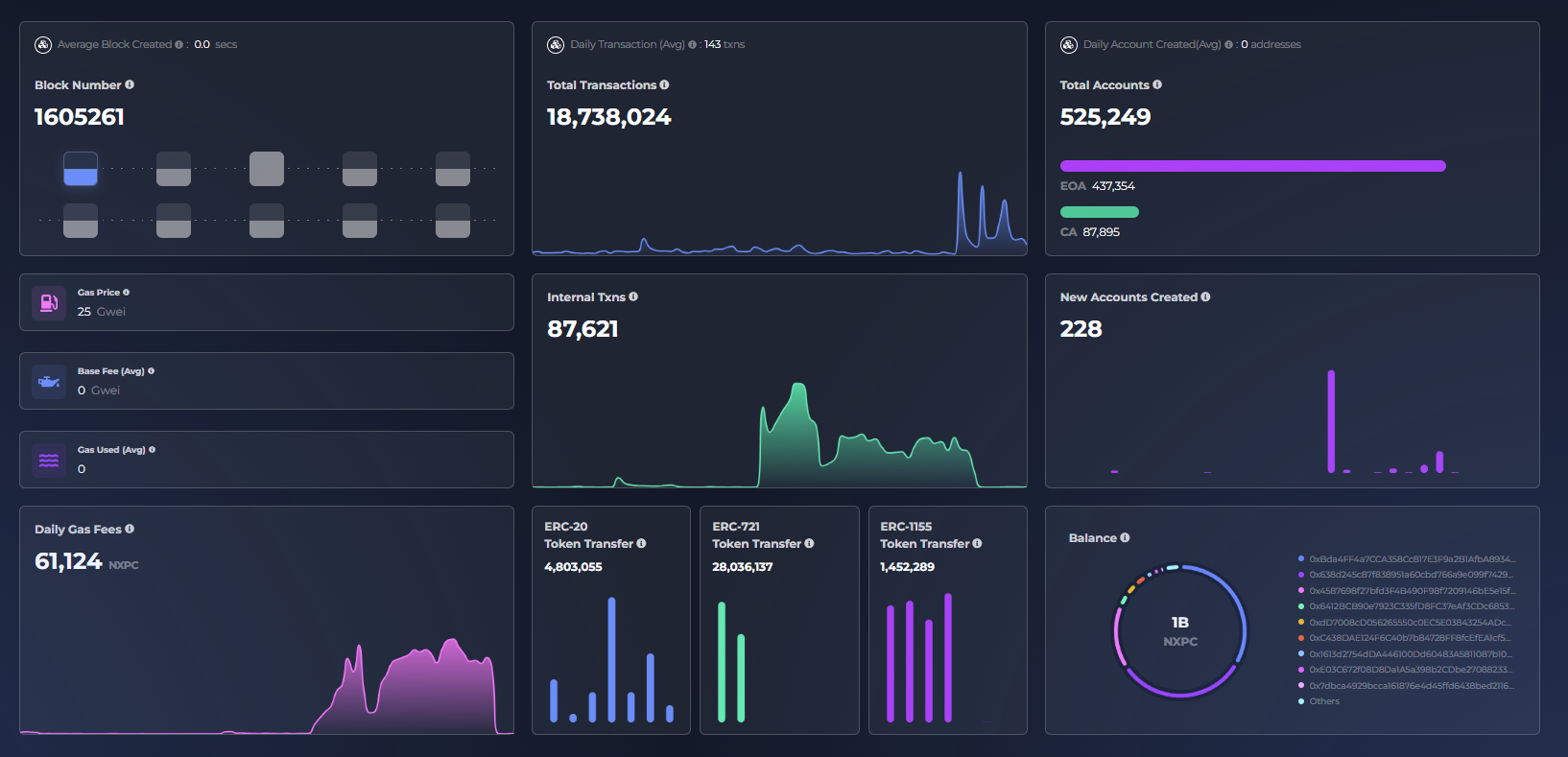
On MSU Explorer’s main page, Maplers can view the latest information on Henesys L1 at a glance.

### **2.1. Search Bar**

Maplers can search for detailed blockchain data by entering one of the following into the search bar:&#x20;

* **Transaction Hash Value:** View details of the transaction, the related block, and associated logs.&#x20;
* **Block Number:** Check block data, including all transactions and internal transactions.&#x20;
* **Wallet Address:** View all related transactions, internal transactions, and token data (ERC-20, ERC-721, ERC-1155).&#x20;
* **Token:** Check details about a specific token.&#x20;
* **NFT:** View information about a particular NFT.&#x20;

### **2.2. Main Dashboard**

<figure><img src="https://812147040-files.gitbook.io/~/files/v0/b/gitbook-x-prod.appspot.com/o/spaces%2FLn0ozm6YMyUQeaVEuGOu%2Fuploads%2FueD765RbjYkNm23ImMcR%2F1.png?alt=media" alt=""><figcaption><p>※ Please note that the image shows test environment and may not reflect the live data.</p></figcaption></figure>

On the main dashboard, Maplers can view:

<table data-header-hidden><thead><tr><th width="245"></th><th></th></tr></thead><tbody><tr><td><strong>Average Block Created</strong></td><td>Average block time of the last 1 hour</td></tr><tr><td><strong>Daily Transaction</strong></td><td>Average number of transactions in the last 3 day</td></tr><tr><td><strong>Daily Account Created</strong></td><td>Average number of accounts created over the last 3 days</td></tr><tr><td><strong>Gas Price</strong></td><td>Gas price of the latest transaction</td></tr><tr><td><strong>Base Fee</strong></td><td>Average block base fee of the last 1 hour</td></tr><tr><td><strong>Gas Used</strong></td><td>Average gas used per block over the last hour</td></tr><tr><td><strong>Internal Transactions</strong></td><td>Total number of internal transactions on Henesys L1</td></tr><tr><td><strong>New Accounts Created</strong></td><td>Number of accounts created over the last 30 days</td></tr><tr><td><strong>Daily Gas Fees</strong></td><td>Amount of fees paid on blocks over the last 24 hours</td></tr><tr><td><strong>ERC-20 Token Transfer</strong></td><td>Total number of ERC-20 token transfers on Henesys L1</td></tr><tr><td><strong>ERC-721 Token Transfer</strong></td><td>Total number of ERC-721 token transfers on Henesys L1</td></tr><tr><td><strong>ERC-1155 Token Transfer</strong></td><td>Total number of ERC-1155 token transfers on Henesys L1</td></tr><tr><td><strong>Balance</strong></td><td>Top 10 MapleStory Universe accounts with the highest NXPC balance</td></tr></tbody></table>

Additionally, at the bottom of the main dashboard, Maplers can view the 10 most recent blocks and the 10 most recent transactions. &#x20;

Clicking on each entry allows Maplers to view its detailed information:&#x20;

* **Latest Blocks**: Displays the 10 most recent blocks, including gas used, number of transactions, and block rewards&#x20;
* **Latest Transactions**: Displays the 10 most recent transactions, including transaction hash, amount of NXPC transferred, sender wallet address, and recipient wallet address&#x20;

## **3. MSU Explorer Navigation Tabs**

<figure><img src="https://812147040-files.gitbook.io/~/files/v0/b/gitbook-x-prod.appspot.com/o/spaces%2FLn0ozm6YMyUQeaVEuGOu%2Fuploads%2FmHch7xQR2bqMKlcvt014%2F2.png?alt=media" alt=""><figcaption><p>※ Please note that the image shows test environment and may not reflect the live data.</p></figcaption></figure>

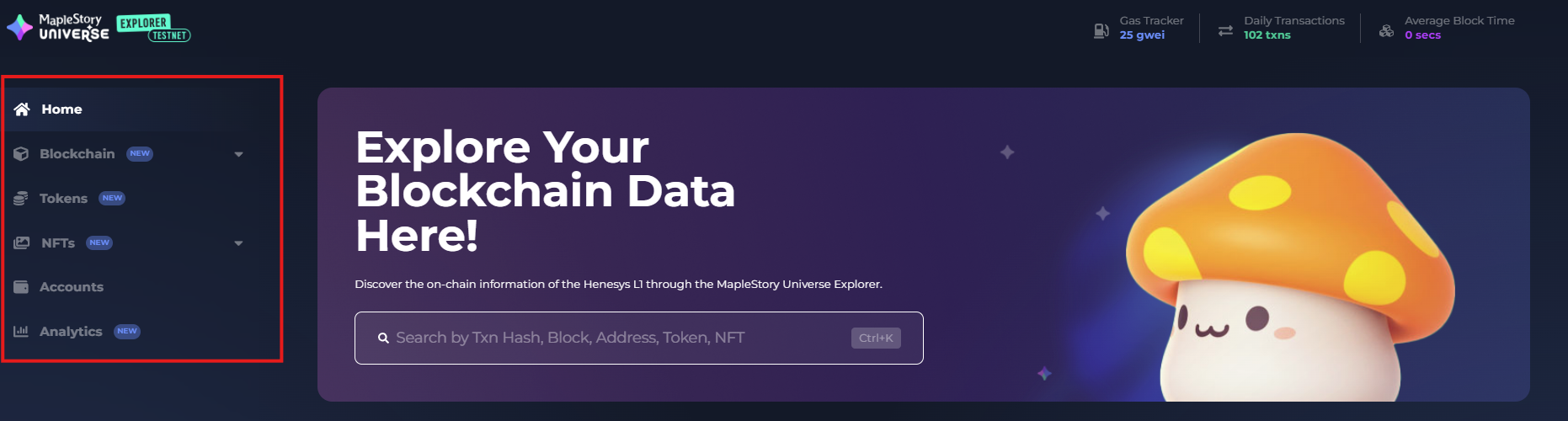
On the left side of MSU Explorer web interface, Maplers can navigate using various functional tabs that provide detailed on-chain data about MapleStory Universe.

1. **Home:** Navigates to the main homepage of MSU Explorer
2. **Blockchain:** Provides access to core blockchain data across four sub-tabs
   1. **Transactions:** View all transactions on Henesys L1 in reverse chronological order
   2. **Internal Transactions:** View all internal transactions executed via smart contracts, listed by latest first
   3. **Blocks:** Explore all blocks on Henesys L1 starting from the most recently generated
   4. **Deployed Contracts:** View smart contracts deployed on Henesys L1
3. **Tokens:** Displays information about supported tokens on Henesys L1
   1. **All Tokens #1:** Native governance token of MapleStory Universe – NXPC
   2. **All Tokens #2:** In-game utility token – NESO
   3. **Token Transfers:** Lists all token transfers on Henesys L1 in reverse chronological order
4. **NFTs:** Offers complete visibility into NFT-related activity across three sub-tabs
   1. **All NFTs & Transfers:** View all NFT types on Henesys L1 and their transfer history
   2. **NFT Trades:** Review all NFT trades that have occurred via the MSU Marketplace
   3. **NFT Mints:** Track all NFT minting events from within MapleStory N
5. **Accounts:** Lists all accounts connected to MapleStory Universe, ordered by NXPC token balance in descending order
6. **Analytics:** Visualize Henesys L1 network and token trends through four categories
   1. **User:** Charts the trend of Unique Active Wallets connected to MapleStory Universe
   2. **Network:** Shows historical data on the number of transactions over time
   3. **Token:** Displays holder trends for NESO, NXPC, and NFTs
   4. **Marketplace:** Tracks the number of unique accounts actively trading on the MSU Marketplace


---

# Agent Instructions
This documentation is published with GitBook. GitBook is the documentation platform designed so that both humans and AI agents can read, navigate, and reason over technical content effectively. Learn more at gitbook.com.

## Querying This Documentation
If you need additional information that is not directly available in this page, you can query the documentation by asking a question.

Perform an HTTP GET request on the following URL with the `ask` and `goal` query parameters:

```
GET https://docs.maplestoryn.io/archives/learn-more/msu-explorer.md?ask=<question>&goal=<user_goal>
```

`ask` is the immediate question: it should be specific, self-contained, and written in natural language.
`goal` is what the user is ultimately trying to achieve, the reason they need the answer. Sharing it helps GitBook give you a better, more relevant answer. A goal is most helpful when it describes the outcome the user wants rather than restating the question. For example, with `ask=how do I create an API token`, a goal like `automate deployments from our CI pipeline` lets GitBook tailor the answer to that use case.

The response will contain a direct answer to the question and relevant excerpts and sources from the documentation.

Use this mechanism when the answer is not explicitly present in the current page, you need clarification or additional context, or you want to retrieve related documentation sections.