> For the complete documentation index, see [llms.txt](https://docs.maplestoryn.io/llms.txt). Markdown versions of documentation pages are available by appending `.md` to page URLs; this page is available as [Markdown](https://docs.maplestoryn.io/archives/neso-and-nxpc.md).
# NESO & NXPC
## **Table of Contents**
1. **What is NESO?**
2. **What is NXPC?**
## **1. What is NESO?**
**NESO** is an **on-chain currency** used within **MapleStory Universe**.\
It is used to **enhance items** in **MapleStory N** and to conduct **transactions** on the **Marketplace**.
You can obtain NESO by **minting NESOLET**, and the two currencies have distinct icons, as shown below:
Icon
Name
How to Get
NESOLET
NESOLET can be obtained by playing in-game contents.
NESO
NESO can be obtained by minting NESOLET or swapping NXPC.
### **1.1. Earning NESO Through Gameplay**
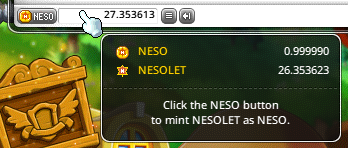
You can obtain NESO by minting NESOLET, which is earned through various in-game activities such as hunting monsters and clearing boss content.
* NESOLET in its unminted state cannot be used for item enhancement or trading, so be sure to mint any NESOLET you acquire!
* The total amount of NESOLET and NESO you have accumulated is displayed at the bottom of your character’s inventory.
* You can view detailed values via the tooltip and use the NESO button at the bottom of the inventory to mint your NESOLET into NESO.
* The conversion rate from NESOLET to NESO is 1:1.
※ NESOLET is a character-bound currency and cannot be used by other characters in your wallet until it is minted.
※ Only the character that completed the minting process can mint NESOLET into NESO. For more details, please refer to the \[[Manage Character Guide](https://docs.maplestoryn.io/msn-101/beginners-guide/get-started/manage-character)].
### **1.2. Earning NESO via SWAP & WARP**
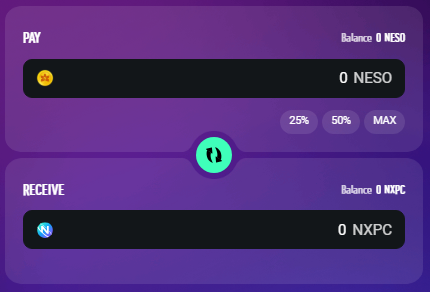
If you have NXPC in your wallet, you can swap it for NESO using the **SWAP & WARP** feature.
Once the swap is complete, the converted NESO can be used on the MSU Marketplace, and if you play the game using the same wallet, it can also be used in-game.
※ Only minted characters can use the Wallet Inventory and perform item enhancements in MapleStory N. For more details, please refer to the respective guides.
### **1.3. Using NESO**
You can use NESO to:
* Purchase NFT items, characters, and consumables from the MSU Marketplace
* Exchange for Power Crystals, used for Star Force Enhancement of NFT items
* Exchange for Power Crystals, used to grant or reset Potential on NFT items
## **2. What is NXPC?**
NXPC is the native token of MapleStory Universe, powering asset creation and value exchange throughout the ecosystem.
You can acquire NXPC by swapping it with NESO earned from playing MapleStory N.
※ The NESO:NXPC swap ratio is 100,000:1.
※ Swapping NESO for NXPC may incur gas fees, depending on conditions.
For more information, please refer to the \[[SWAP & WARP Guide](https://docs.maplestoryn.io/msn-101/learn-more/swap-and-warp)].
### 2.1 Purchasing NXPC with Fiat Currency
Our On-Ramp service enables you to buy NXPC (Henesys Chain) directly with fiat currencies, using payment methods such as a credit card.
Once purchased, you can immediately swap your NXPC for NESO or use it to reach Credit Level 1.
※ Please note that all On-Ramp purchases are processed directly by the provider. NEXPACE does not handle or store any payment information.
※ This service is currently offered through Transak and Mercuryo. Additional providers may be added in the future.
To get started, connect your wallet, click the 'Buy NXPC' button found on the following page, and select your desired provider:
* MapleStory Universe > My page > Overview > Asset Status
* MapleStory Universe > My page > Credit Level > Level 1 Criteria
* Swap\&Warp > Swap > NXPC
On the ‘Buy Crypto To Your Wallet’ screen, select your desired fiat currency and payment method to continue.
You may be asked to complete a KYC verification, depending on the transaction amount. You will be able to review applicable transaction fees before finalizing your purchase.
※ For detailed information on supported countries, currencies, fees, and payment methods, please consult the provider's official documentation, as these may vary.
Once your purchase is complete, you will receive a confirmation email with the transaction details.
{% hint style="info" %}
※ For any issues or inquiries that arise during the purchase process, please contact [Transak Customer Support](https://support.transak.com/en/) for assistance.
※ For any issues or inquiries that arise during the purchase process, please contact [Mercuryo Customer Support](https://help.mercuryo.io/hc/en-gb) for assistance.
{% endhint %}
---
# Agent Instructions
This documentation is published with GitBook. GitBook is the documentation platform designed so that both humans and AI agents can read, navigate, and reason over technical content effectively. Learn more at gitbook.com.
## Querying This Documentation
If you need additional information that is not directly available in this page, you can query the documentation by asking a question.
Perform an HTTP GET request on the following URL with the `ask` and `goal` query parameters:
```
GET https://docs.maplestoryn.io/archives/neso-and-nxpc.md?ask=&goal=
```
`ask` is the immediate question: it should be specific, self-contained, and written in natural language.
`goal` is what the user is ultimately trying to achieve, the reason they need the answer. Sharing it helps GitBook give you a better, more relevant answer. A goal is most helpful when it describes the outcome the user wants rather than restating the question. For example, with `ask=how do I create an API token`, a goal like `automate deployments from our CI pipeline` lets GitBook tailor the answer to that use case.
The response will contain a direct answer to the question and relevant excerpts and sources from the documentation.
Use this mechanism when the answer is not explicitly present in the current page, you need clarification or additional context, or you want to retrieve related documentation sections.